

目标文件的格式是什么
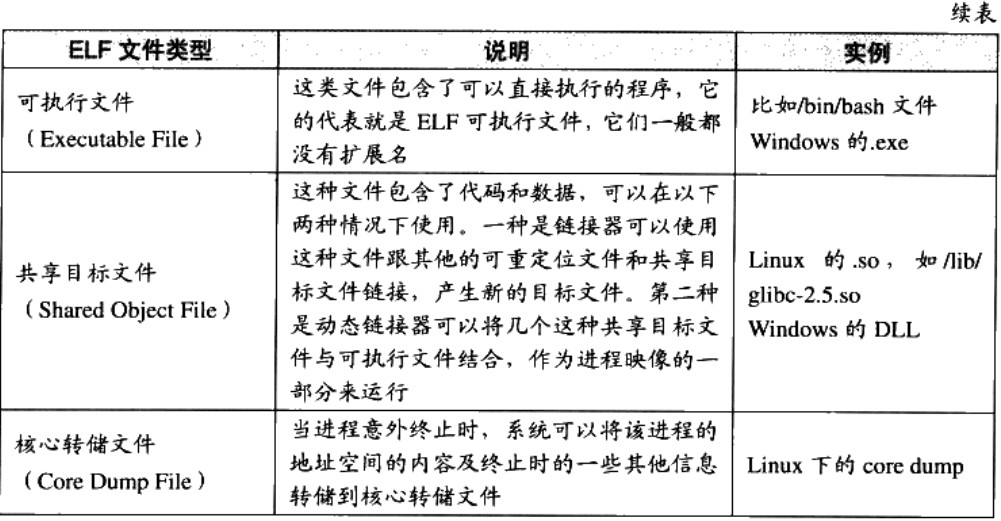
流行的可执行文件格式主要是win下的PE(Portable Executable) 和 Linux下的ELF(Executable Linkable Format),它们皆为COFF(Common file format)格式的变种
linux下的目标文件后缀为.o,终端中查看.o文件类型信息如下:[root@slave02 temp]# file hello.ohello.o: ELF 64-bit LSB relocatable, x86-64, version 1 (SYSV), not stripped
| 均按照可执行文件格式存储 | win下 | linux下 |
|---|---|---|
| 可执行文件 | .exe | ELF |
| 动态链接库 | .dll | .so |
| 静态链接库 | .lib | .a |


目标文件包含哪些内容
目标文件中的内容包括 编译后的机器指令代码、数据和供后续链接时所需要的一些信息,如符号表、调试信息、字符串等
目标文件内部分成不同的段, 简单例子如下: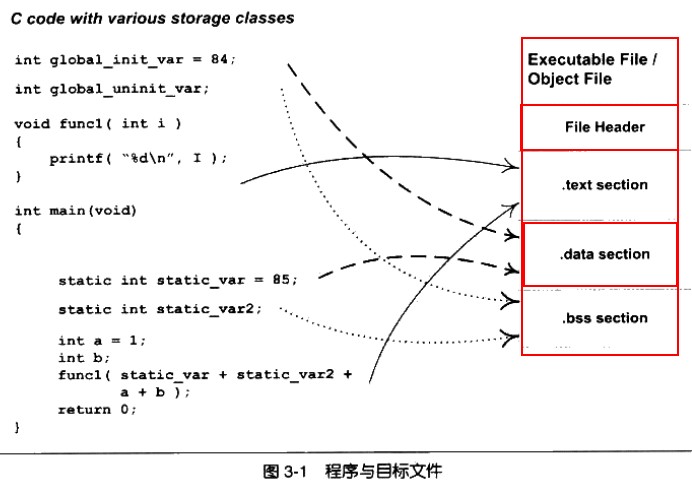

指令和数据分开存放的好处
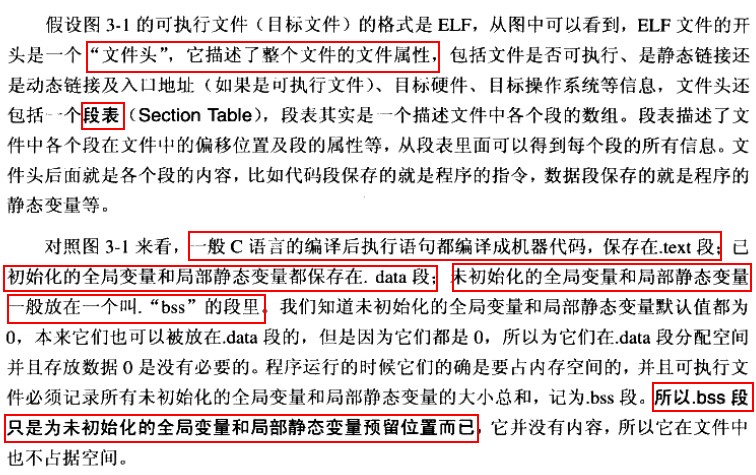
- 指令段设置为只读,数据段设置为可读写,提高安全性
- 有利于提高cache缓存命中率
- 当系统中运行多个该程序的副本时,只需保留一份指令段,当然,每个进程的数据段是私有的。有利于节省大量内存空间。
细探SimpleSection.o
在centos中编辑如下文件:
 //SimpleSection.c文件内容
#include <stdio.h>

int global_init_var = 84;
int global_unint_var;

void func1(int i){
        printf("%d\n", i);
}

int main(void){
        static int static_var = 85;
        static int static_var2;
        int a=1;
        int b;

        func1(static_var+static_var2+a+b);

        return a;
}
然后运行gcc -c SimpleSection.c得到目标文件SimpleSection.o
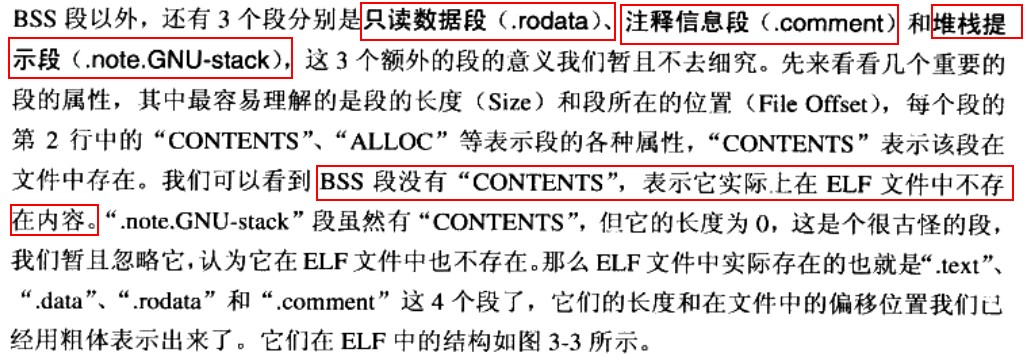
使用objdump命令或者readelf命令查看.o文件objdump -h SimpleSection.o
SimpleSection.o:     file format elf64-x86-64

Sections:
Idx Name          Size      VMA               LMA               File off  Algn
  0 .text         00000054  0000000000000000  0000000000000000  00000040  2**0
                  CONTENTS, ALLOC, LOAD, RELOC, READONLY, CODE
  1 .data         00000008  0000000000000000  0000000000000000  00000094  2**2
                  CONTENTS, ALLOC, LOAD, DATA
  2 .bss          00000004  0000000000000000  0000000000000000  0000009c  2**2
                  ALLOC
  3 .rodata       00000004  0000000000000000  0000000000000000  0000009c  2**0
                  CONTENTS, ALLOC, LOAD, READONLY, DATA
  4 .comment      0000002e  0000000000000000  0000000000000000  000000a0  2**0
                  CONTENTS, READONLY
  5 .note.GNU-stack 00000000  0000000000000000  0000000000000000  000000ce  2**0
                  CONTENTS, READONLY
  6 .eh_frame     00000058  0000000000000000  0000000000000000  000000d0  2**3
                  CONTENTS, ALLOC, LOAD, RELOC, READONLY, DATA

代码段
Contents of section .text:
 0000 554889e5 4883ec10 897dfc8b 45fc89c6  UH..H....}..E...
 0010 bf000000 00b80000 0000e800 000000c9  ................
 0020 c3554889 e54883ec 10c745fc 01000000  .UH..H....E.....
 0030 8b150000 00008b05 00000000 01c28b45  ...............E
 0040 fc01c28b 45f801d0 89c7e800 0000008b  ....E...........
 0050 45fcc9c3                             E...

略去无关内容。。。

0000000000000000 :
   0:   55                      push   %rbp
   1:   48 89 e5                mov    %rsp,%rbp
   4:   48 83 ec 10             sub    $0x10,%rsp
   8:   89 7d fc                mov    %edi,-0x4(%rbp)
   b:   8b 45 fc                mov    -0x4(%rbp),%eax
   e:   89 c6                   mov    %eax,%esi
  10:   bf 00 00 00 00          mov    $0x0,%edi
  15:   b8 00 00 00 00          mov    $0x0,%eax
  1a:   e8 00 00 00 00          callq  1f
  1f:   c9                      leaveq
  20:   c3                      retq

0000000000000021 :
  21:   55                      push   %rbp
  22:   48 89 e5                mov    %rsp,%rbp
  25:   48 83 ec 10             sub    $0x10,%rsp
  29:   c7 45 fc 01 00 00 00    movl   $0x1,-0x4(%rbp)
  30:   8b 15 00 00 00 00       mov    0x0(%rip),%edx        # 36
  36:   8b 05 00 00 00 00       mov    0x0(%rip),%eax        # 3c
  3c:   01 c2                   add    %eax,%edx
  3e:   8b 45 fc                mov    -0x4(%rbp),%eax
  41:   01 c2                   add    %eax,%edx
  43:   8b 45 f8                mov    -0x8(%rbp),%eax
  46:   01 d0                   add    %edx,%eax
  48:   89 c7                   mov    %eax,%edi
  4a:   e8 00 00 00 00          callq  4f
  4f:   8b 45 fc                mov    -0x4(%rbp),%eax
  52:   c9                      leaveq
  53:   c3                      retq
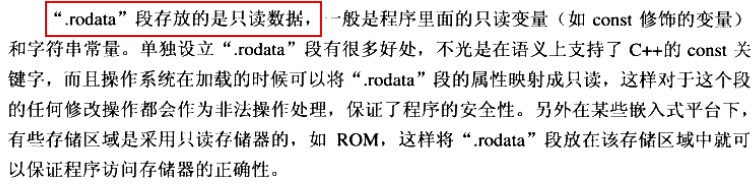
数据段和只读数据段


.bbs段

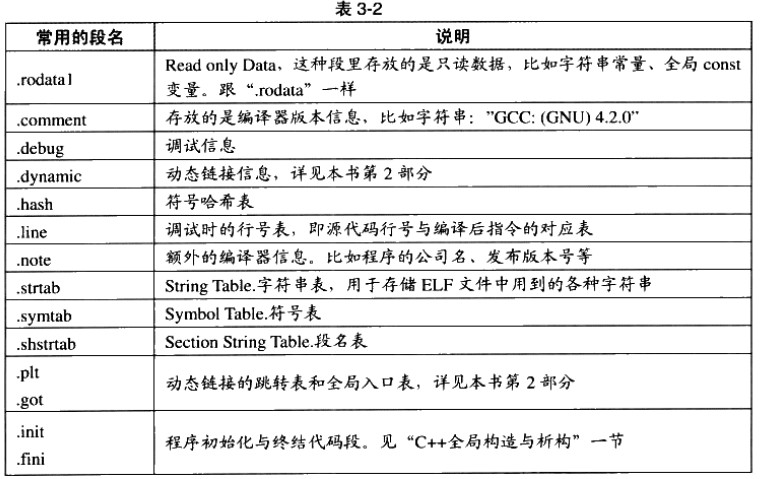
其他段
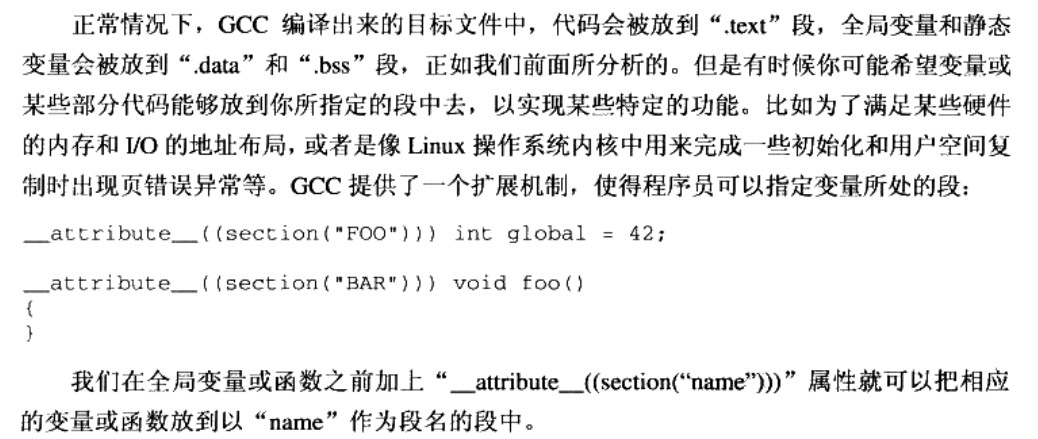
自定义段
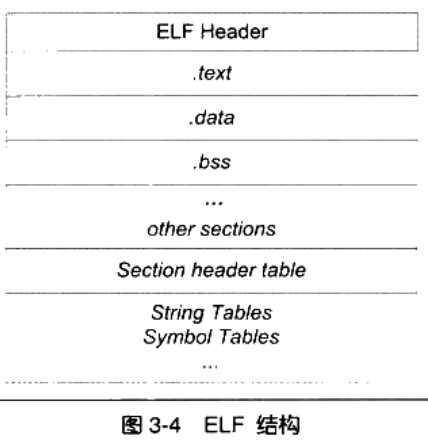
ELF文件结构描述
ELF文件头
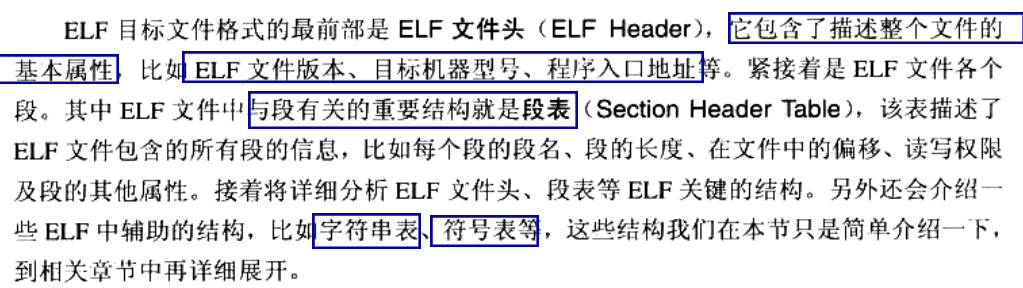
[cmd] readelf -h SimpleSection.o
ELF Header:
  Magic:   7f 45 4c 46 02 01 01 00 00 00 00 00 00 00 00 00
  Class:                             ELF64
  Data:                              2's complement, little endian
  Version:                           1 (current)
  OS/ABI:                            UNIX - System V
  ABI Version:                       0
  Type:                              REL (Relocatable file)
  Machine:                           Advanced Micro Devices X86-64
  Version:                           0x1
  Entry point address:               0x0
  Start of program headers:          0 (bytes into file)
  Start of section headers:          1056 (bytes into file)
  Flags:                             0x0
  Size of this header:               64 (bytes)
  Size of program headers:           0 (bytes)
  Number of program headers:         0
  Size of section headers:           64 (bytes)
  Number of section headers:         13
  Section header string table index: 10

段表(Section Header Table)
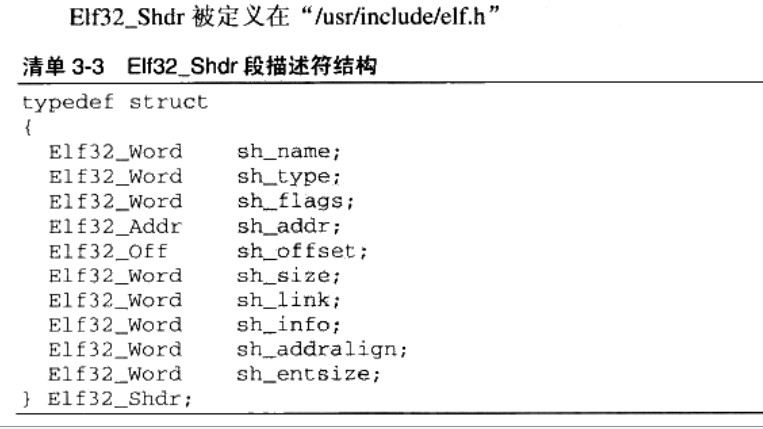
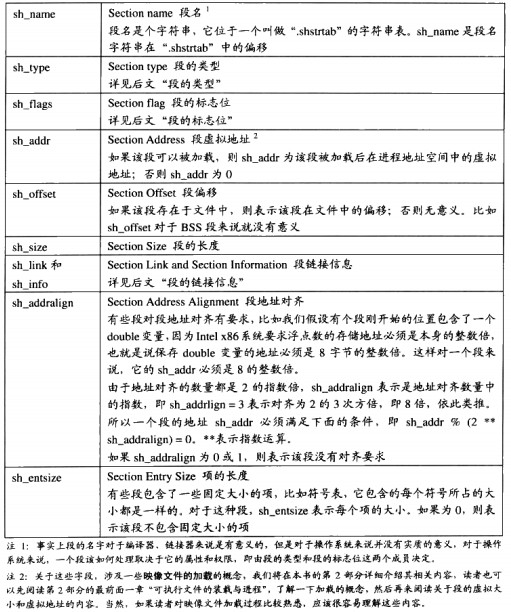
它是除了文件头外最重要的结构,用于描述各个段的信息,比如:段名,段长,在文件中的位置偏移,读写权限和其它属性[cmd] readelf -S SimpleSection.o
There are 13 section headers, starting at offset 0x420:

Section Headers:
  [Nr] Name              Type             Address           Offset
       Size              EntSize          Flags  Link  Info  Align
  [ 0]                   NULL             0000000000000000  00000000
       0000000000000000  0000000000000000           0     0     0
  [ 1] .text             PROGBITS         0000000000000000  00000040
       0000000000000054  0000000000000000  AX       0     0     1
  [ 2] .rela.text        RELA             0000000000000000  00000378
       0000000000000078  0000000000000018   I      11     1     8
  [ 3] .data             PROGBITS         0000000000000000  00000094
       0000000000000008  0000000000000000  WA       0     0     4
  [ 4] .bss              NOBITS           0000000000000000  0000009c
       0000000000000004  0000000000000000  WA       0     0     4
  [ 5] .rodata           PROGBITS         0000000000000000  0000009c
       0000000000000004  0000000000000000   A       0     0     1
  [ 6] .comment          PROGBITS         0000000000000000  000000a0
       000000000000002e  0000000000000001  MS       0     0     1
  [ 7] .note.GNU-stack   PROGBITS         0000000000000000  000000ce
       0000000000000000  0000000000000000           0     0     1
  [ 8] .eh_frame         PROGBITS         0000000000000000  000000d0
       0000000000000058  0000000000000000   A       0     0     8
  [ 9] .rela.eh_frame    RELA             0000000000000000  000003f0
       0000000000000030  0000000000000018   I      11     8     8
  [10] .shstrtab         STRTAB           0000000000000000  00000128
       0000000000000061  0000000000000000           0     0     1
  [11] .symtab           SYMTAB           0000000000000000  00000190
       0000000000000180  0000000000000018          12    11     8
  [12] .strtab           STRTAB           0000000000000000  00000310
       0000000000000065  0000000000000000           0     0     1
Key to Flags:
  W (write), A (alloc), X (execute), M (merge), S (strings), l (large)
  I (info), L (link order), G (group), T (TLS), E (exclude), x (unknown)
  O (extra OS processing required) o (OS specific), p (processor specific)

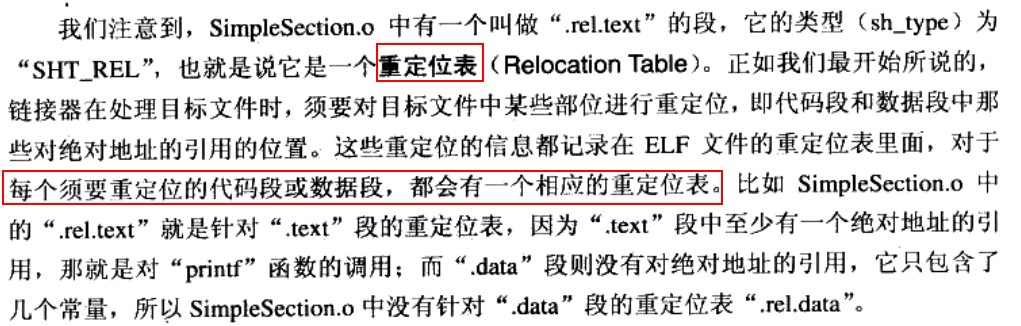
重定位表
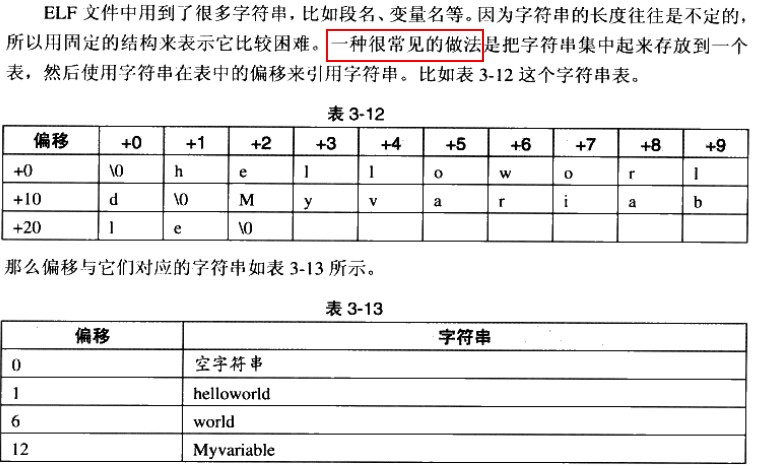
字符串表

链接的Interface–符号
链接本质上就是将不同的目标文件”粘”到一起,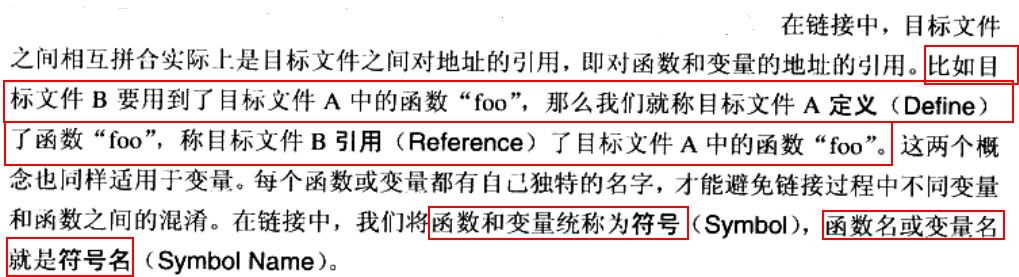
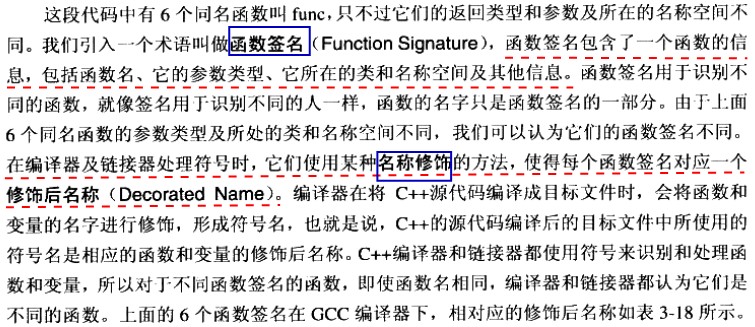
C++名称修饰机制实现函数重载
int func(int);
float func(float);

class C{
    int func(int);
    class C2{
       int func(int);
    };
};

namespace N{
    int func(int);
    class C{
       int func(int);
    };

}
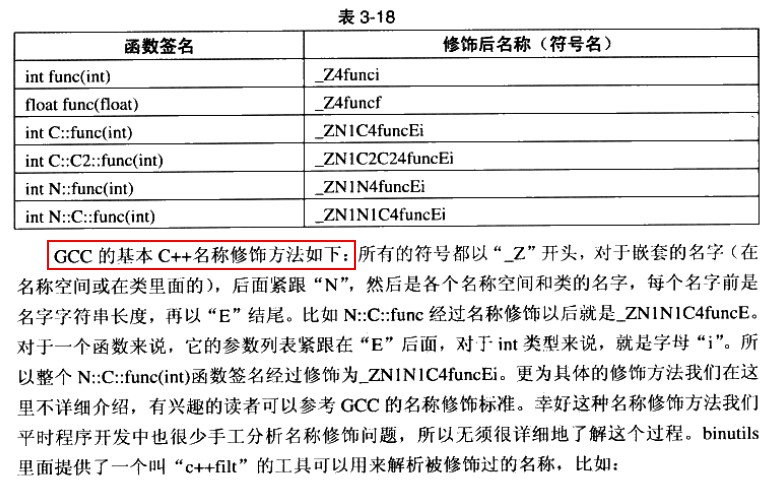

值得注意的是,visual studio的名称修饰规则和上述规则不同,但目的都相同。
extern “C”

模板
模板