
开篇词
文本分类是NLP领域最基本和最常见的任务之一,同时它也是检验众多nlp算法模型的重要手段。本项目注重应用各种经典的机器学习模型(含深度学习模型)对单标签新闻进行分类的方法,同时注重分析总结各种算法模型的优缺点
语料准备
在做新闻分类前,首先需要准备好新闻语料,通常有2种途径:
- 要么使用网上公开的新闻语料,但数据量通常不大,比如: 搜狐新闻数据 网易分类文本数据 THUCNews中文文本数据集 等等
- 要么在各大新闻网站采用爬虫技术爬取新闻语料,姿势正确的话想要多少数据量就能爬取多少数据量
本项目设计采用50W条新闻语料做训练集,50W条新闻语料做测试集,对10个新闻类别进行分类。
由于现有语料无法满足需求,所以决定自制爬虫来收集这100w条新闻语料
目标网站
考虑到爬虫技术与各大网站反爬虫技术的彼此争斗,同时需要短时间内大量爬取到新闻语料,笔者决定在中国新闻网进行新闻语料的爬取和收集。
爬取思路
先从首页进去,点击滚动栏目
再点击各个新闻类别对应的栏目,如IT
此时,可以看到左侧为查看往日回顾栏目,右侧为IT类别下的若干新闻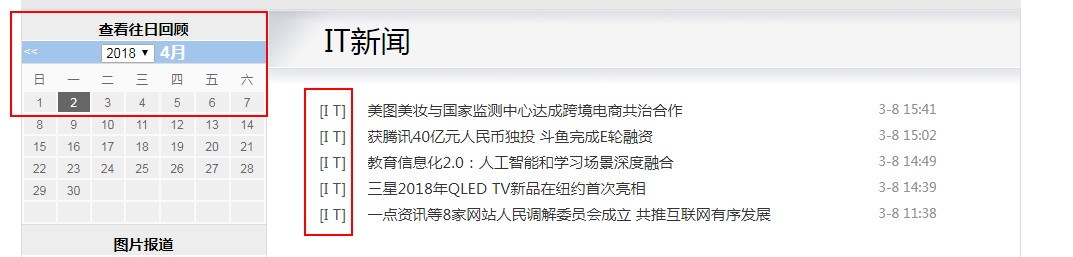
随机在查看往日回顾栏目中挑选几个不同年月日的时间,并注意观察此时对应页面的URL,比如以下这3条:http://www.chinanews.com/scroll-news/it/2015/0408/news.shtmlhttp://www.chinanews.com/scroll-news/it/2016/0405/news.shtmlhttp://www.chinanews.com/scroll-news/it/2017/0411/news.shtml
聪明的你一定发现,不同的IT类新闻合集页面对应的URL只是在日期部分有差异,
接着我们随便点进去一条具体的新闻页面,比如下面这个
此时发现,我们的目标不就是爬取100W条类似这样的新闻语料吗?
于是爬取这100w条新闻的整体框架就形成了。
我们分成2步来做:
step 1 爬取100w条URL链接
首先,确定要爬取的10个新闻类别,每个类别分别大致爬取10W条URL链接并分别保存。笔者最终确定的10个类别为:
财经、房产、IT、军事、能源、汽车、健康、体育、文化、娱乐
接着,利用不同日期下的新闻合集页面对应的URL只是在日期部分有差异这一特性,收集不同年、月、日下的新闻URL链接
python3.5 代码如下:
 //通过改变控制参数,爬取100w条URL链接
# -*- encoding: utf-8 -*-
from bs4 import BeautifulSoup
import urllib.request
import re
import sys
import codecs
import csv
import time
from requests.exceptions import RequestException
import socket

# global variable
CAT='yl'    #设置欲爬取的新闻类别,当前为"娱乐"

year = '2014'  #设置欲爬取年份,当前为2014年份
#monthList =  ['06','07','08','09','10','11','12']
monthList =  ['04','05','06','07','08','09','10','11','12'] #设置欲爬取月份
#monthList=['11','12']
dayList=['01','02','03','04','05','06','07','08','09','10','11','12','13','14',
'15','16','17','18','19','20','21','22','23','24','25','26','27','28','29','30']
#dayList=["01","02","03","04","05","06","07","08","09"]
#dayList=["19"] # 测试单日用

news1  = list()  # 国际
news2  = list()  # 社会
news3  = list()  # 国内
news4  = list()  # 文化
news5  = list()  # 房产
news6  = list()  # 体育
news7  = list()  # 财经
news8  = list()  # 军事
news9  = list()  # 娱乐
news10 = list()  # 证券
news11 = list()  # 汽车
news12 = list()  # 金融
news13 = list()  # I T
news14 = list()  # 生活
news15 = list()  # 教育
news16 = list()  # 法治

CLASS_DICT={
    "国际":news1,
    "国    际":news1,
    "社会":news2,
    "社    会":news2,
    "国内":news3,
    "国    内":news3,
    "文化":news4,
    "文    化":news4,
    "房产":news5,
    "[房产]":news5,
    "体育":news6,
    "体    育":news6,
    "财经":news7,
    "财    经":news7,
    "[军事]":news8,
    "娱乐":news9,
    "[娱乐]":news9,
    "证券":news10,
    "证    券":news10,
    "汽车":news11,
    "[汽车]":news11,
    "金融":news12,
    "[金融]":news12,
    "I  T":news13,
    "I      T":news13,
    "生活":news14,
    "生    活":news14,
    "能源":news15,
    "[能源]":news15,
    "法治":news16,
    "法    治":news16,
    }


def download(url):
    print(url)
    req = urllib.request.Request(url)
    try:
        response=urllib.request.urlopen(req,timeout=2) #可以设置超时时间控制 例如:0.5s  urlopen(req,timeout=0.5)
        html =response.read().decode('gbk')  // 必须定义好解析格`gbk`
    except urllib.error.HTTPError as e:
        html = None
        print('No valid url')
    except socket.timeout as e:
        html = None
        print('No valid url')
    except RequestException as e:
        html = None
        print('No valid url')
    except Exception:
        html = None
        print('No valid url')
    return html

def getTagByClass(bsobj, tagName):
    #     print 'Get %s by class:%s'%(tagName,classValue)
    try:
        value = bsobj.findAll(tagName,style=None)  #过滤掉 style不为空的p标签
    except AttributeError as e:
        return None
    return value

def crawSingleURL(url,catalog,TEXT_NUMBER):
    html = download(url)
    if (html == None):
        return False
    soup = BeautifulSoup(html, "lxml")
    # 获取文章内容
    Contents = getTagByClass(soup, "p")
    # 提取文章内容
    content = str()
    # 获取每篇预测的URL
    for item in Contents:
        link = item.find("a")  # item.find("a",href=re.compile("^https://headlines.yahoo.co.jp/hl*"))
        if link is None:
            # newpage =  link.attrs['href']
            content += item.get_text() + '\n'

    # print(content)
    # 写入CSV  需要预先在程序相同的目录下创建files文件夹
    output = open("E:/TEXTCRAWER/" + catalog + "/" + str(TEXT_NUMBER) + ".txt", 'w')
    try:
        writer = output.write(content)
    finally:
        output.close()
    # print("ok! url=\"", url, "\"","text OUTPUT:", TEXT_NUMBER)
    return True

def MAP(str):
    return CLASS_DICT.get(str,"NoValid")

def runCrawler(year,monthList,CAT):
    # 生成要抓取的url地址
    # Demo: http://www.chinanews.com/scroll-news/2017/1118/news.shtml

    urlPrefix='http://www.chinanews.com/scroll-news/'
    urlSuffix='/news.shtml'
    for month in monthList:
        for day in dayList:
            // 这里生成要抓取的URL
            newURL=urlPrefix+CAT+'/'+year+'/'+month+day+urlSuffix
            html=download(newURL)
            time.sleep(1)  // 控制延时 以秒为单位
            if (html == None):  // 跳过无效html
                continue
            print("process Year: " + year + " Month: " + month + " Day: " + day + " ..."+"Tag: " +CAT)
            soup = BeautifulSoup(html, "lxml")
            # 获取本滚动页面的文章内容
            Contents = getTagByClass(soup, "li")

            for item in Contents:
                #link = item.findAll("dd_lm","dd_bt")
                if (len(item)==4):
                    #print(link[0].text)
                    res=MAP(item.contents[0].text)
                    if res != "NoValid":
                        res.append(item.contents[2].contents[0].attrs["href"])
        saveURL(month,CAT)
        news1.clear()
        news2.clear()
        news3.clear()
        news4.clear()
        news5.clear()
        news6.clear()
        news7.clear()
        news8.clear()
        news9.clear()
        news10.clear()
        news11.clear()
        news12.clear()
        news13.clear()
        news14.clear()
        news15.clear()
        news16.clear()

def saveURL(month,CAT):
    #'mil/hd2011/2012/11-21/149641.shtml'
    ValidPRefix='chinanews.com/'+'yl'+'/'
    suffex_str='/'+CAT+'/'
    newPath="E:/TEXTCRAWER"+suffex_str+year+"/URL"+str(month)+".txt" # 设置存在E盘下
    # 写入CSV  需要预先在程序相同的目录下创建各个文件夹
    output = open(newPath, 'w')
    for url in Which(CAT):
        if url.find(ValidPRefix) != -1:
            writer = output.write(url+'\n')
    output.close()

def Who(container):
    if container == news1:
        return '/gj/'
    if container == news2:
        return '/sh/'
    if container == news3:
        return '/gn/'
    if container == news4:
        return '/cul/'
    if container == news5:
        return '/house/'
    if container == news6:
        return '/ty/'
    if container == news7:
        return '/cj/'
    if container == news8:
        return '/mil/'
    if container == news9:
        return '/yl/'
    if container == news10:
        return '/stock/'
    if container == news11:
        return '/auto/'
    if container == news12:
        return '/fortune/'
    if container == news13:
        return '/it/'
    if container == news14:
        return '/life/'
    if container == news15:
        return '/ny/'
    if container == news16:
        return '/fz/'
    else:
        return '/business/'

def Which(CAT):
    if CAT == 'gj':
        return news1
    if CAT == 'sh':
        return news2
    if CAT == 'gn':
        return news3
    if CAT == 'cul':
        return news4
    if CAT == 'house' or CAT == 'estate':
        return news5
    if CAT == 'ty':
        return news6
    if CAT == 'cj':
        return news7
    if CAT == 'mil':
        return news8
    if CAT == 'yl':
        return news9
    if CAT == 'stock':
        return news10
    if CAT == 'auto':
        return news11
    if CAT == 'fortune':
        return news12
    if CAT == 'it':
        return news13
    if CAT == 'life':
        return news14
    if CAT == 'edu' or CAT == 'ny':
        return news15
    if CAT == 'fz':
        return news16

def main():
    runCrawler(year,monthList,CAT)
    #a='http://finance.chinanews.com/house/2013/01-02/4452930.shtml'.find('ghinanews.com/house/')

if __name__ == '__main__':
    main()
以上代码,大体分为设置欲爬取的年月日信息、利用规则生成URL、通过request请求页面、再利用BeautifulSoup解析返回的页面信息、提取所有的具体新闻的URL链接并保存这些环节,这里不做过多解释,可以看注释部分。笔者写的代码普适性虽不高,但重在实用。
step 2 爬取100W条具体新闻
第一步得到了10个类别的各10w条URL链接,并分别保存在10个txt文件中,
接下来,就是从这10个文本中逐行读取每条URL链接,并请求页面返回每条新闻的内容,解析并保存正文内容
python 3.5 代码如下:
# -*- encoding: utf-8 -*-
from bs4 import BeautifulSoup
import urllib.request
import re
import sys
import codecs
import csv
import time
from lxml import etree
from requests.exceptions import RequestException
import socket

def download(url):
    req = urllib.request.Request(url)
    try:
        response=urllib.request.urlopen(req,timeout=10) #可以设置超时时间控制 例如:0.5s  urlopen(req,timeout=0.5)
        html =response.read().decode('gbk')
    except urllib.error.HTTPError as e:
        html = None
        print('No valid url')
    except socket.timeout as e:
        html = None
        print('No valid url')
    except RequestException as e:
        html = None
        print('No valid url')
    except Exception:
        html = None
        print('Time out')
    return html

def getTagByClass(bsobj, tagName):
    #     print 'Get %s by class:%s'%(tagName,classValue)
    try:
        value = bsobj.findAll(tagName,style=None)  #过滤掉 style不为空的p标签
    except AttributeError as e:
        return None
    return value

def crawSingleURL(filePath,outPath,TEXT_NUMBER,BUGG):
    with open(filePath) as file:
        for url in file:

            #url='http://finance.chinanews.com/auto/2014/05-30/6230919.shtml'
            url = "http://www.chinanews.com" + url
            html = download(url)
            if (html == None):
                continue
            #soup = BeautifulSoup(html, "lxml")
            selector=etree.HTML(html)
            #Contents=selector.xpath("//div[@class=\"left_zw\"]//p/text()")
            Contents = selector.xpath("//div[@class=\"left_zw\"]//p/text()")
            if len(Contents) == 0 :
                BUGG=BUGG+1
                if(BUGG>600):
                    print('Something wrong with this url',url," Number: ",TEXT_NUMBER)
                    exit(-1)
                    break
                else:
                    continue
            with  open(outPath + "/" + str(TEXT_NUMBER) + ".txt", 'w', encoding='utf-8') as writer:
                for item in Contents:
                        writer.write(str(item) + '\n')

            TEXT_NUMBER=TEXT_NUMBER+1
            if TEXT_NUMBER%50 == 0:
                print("ok! url=\"", url, "\"","text OUTPUT:", TEXT_NUMBER)


def main():
    urlFilePath="E:/TEXTCRAWER/yl/yule.txt"
    outPath="E:/TEXTCRAWER/yl/corpus"
    textNUM=0
    BUGG=0
    crawSingleURL(urlFilePath,outPath,textNUM,BUGG)


if __name__ == '__main__':
这样,经过上面2个环节,这100W条新闻语料就得到了。
当然,实际中笔者是这样做的:先在2台centos云服务器(具体哪个厂商的云服务器就不透露了,免得说笔者打广告啊)上安装anaconda软件并配置为通过浏览器可访问jupyter,然后在jupyter中开启3-5个脚本同时运行上述2个环节中的代码,以此来提高爬取速率。
总结
作为本项目的开篇,笔者主要阐述了如何为后续算法模型准备足够量的新闻语料。大体上通过2个步骤的爬虫过程来爬取到10个类别共计100W条的新闻语料。
在下一篇中,笔者会探讨文本语料的前处理过程。